Offline AI for research that cites every source.
Oswin runs a language model on your own computer. Give it your papers, books and notes; it writes clear, scholarly answers and footnotes every claim to a page in your library, in MLA, Chicago, APA, Turabian or SBL. Nothing is uploaded. Nothing is invented.
 OswinAI
The Republic did not fall in a single stroke. Syme argued that the Augustan settlement was a change of ruling faction dressed in the old forms,1 and by the 50s BC the senatorial class was still bargaining with the great commanders rather than surrendering to them.2 Gruen reads the conference of Luca the same way: an aristocracy negotiating, not yet defeated.3
Turabian · SBL
Documents go in. Cited pages come out. All of it on your own desktop.
Oswin installs on the computer on your desk. Your files are read there, the model thinks there, and the footnoted answer is written there. The only thing that travels is the file you choose to export.
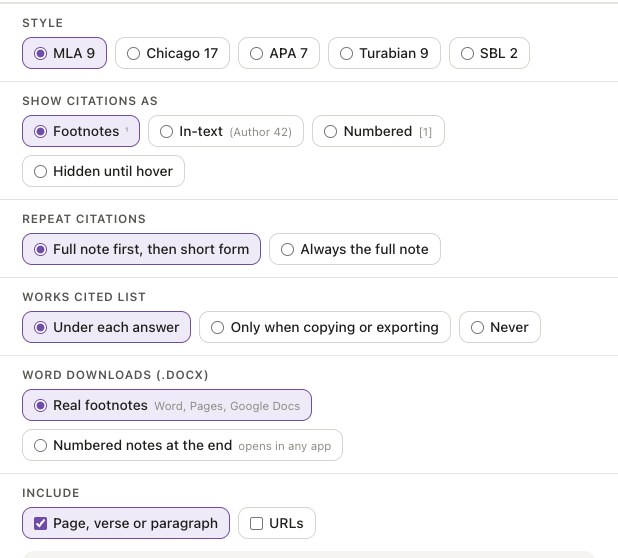
Every setting a citation editor would ask for.
Oswin keeps the source attached to each sentence, so citations are a setting rather than a rewrite. Choose the standard once and every answer, copy and export follows it.
- Five standards. MLA 9, Chicago 17, APA 7, Turabian 9 and SBL 2, with the right punctuation, order and italics for each.
- Footnotes, in-text or numbered. Superscripts, (Author 42), or [1], and a hidden-until-hover option for reading.
- Short form after the first note. Full note first, then the short form, the way a copy editor would do it.
- Location on every note. Page, paragraph, section or timestamp; URLs and DOIs when you want them.
- Real footnotes in Word. The .docx export uses Word's own footnote system, not text at the bottom.
Cloud chatbots read the internet. Oswin reads your shelf.
A general chatbot answers from everything it has ever seen and can cite a paper that doesn't exist. Oswin answers from the documents you chose, and every footnote points to a real page in one of them.
Ask. Read. Cite. On your machine, start to finish.
A live loop of the whole process: the question, the documents it reads, the answer it writes, the notes it attaches. Flip the switch and pull the plug; nothing changes.
One answer. Any citation standard.
Switch the style below and watch the notes and bibliography re-form. These are the same controls as the app's Citation settings.
Import. Ask. Cite. Export.
Four steps, all on your machine. The tour advances on its own; click a step to jump.
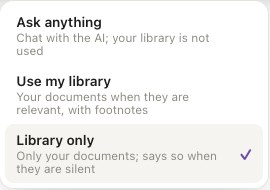
You decide how much the model may say.
Strict when you need every sentence sourced, relaxed when you want a quick explanation. The mode sits right in the prompt bar.
Drop in what you already have.
Files are split into excerpts (paragraphs, pages, rows) and indexed on your disk. Each excerpt keeps its author, title, year and location for the notes.
Documents
PDFs with a text layer, Word files with their headings and footnotes, plain text and Markdown. Headings become section locations in citations.
Web & data
Saved web pages keep their title as the source title. CSV rows and Q&A JSON pairs each become an excerpt.
Code
Functions and classes become excerpts, so you can ask how a codebase works and get file and line references.
Not yet
Convert first and they import fine: EPUB to .docx, old .doc to .docx, slides to PDF, sheets to CSV, scanned PDFs through OCR.
For anyone who has to show their sources.
Pick a desk. The example library, question and answer change with it.
What's actually on your disk
A local language model
A compact instruction-tuned model, bundled with the app and run on your CPU or GPU. No API key, no usage sent anywhere. Swap in your own GGUF model if you like.
A private index
Every file is split into excerpts and indexed for meaning as well as words. Remove a file and its excerpts are gone.
Citation metadata
Author, title, publisher, year and location are kept per excerpt. "Describe documents" fills in missing fields so notes come out clean.
Free to install. Free to keep.
150,000 tokens a day, no account. Go Unlimited when you're writing all day.